
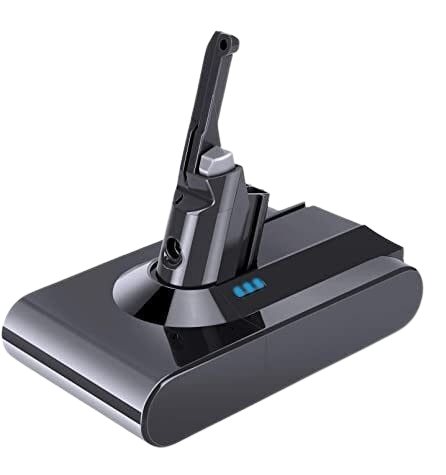
Dyson vacuums are known for their reliability, powerful suction, and innovative design. Among their popular models, the Dyson V8 stands out for its balance of power and runtime, making it a preferred choice for many households. However, like all cordless vacuums, the performance of a Dyson V8 battery can diminish over time. Knowing your options for upgrading the Dyson V8 battery can help you maintain peak performance and extend the life of your vacuum.
Why Upgrade Your Dyson V8 Battery?
Over time, lithium-ion batteries naturally lose capacity. If you notice your Dyson V8 running out of charge faster, or if it can’t hold a full charge, it might be time to consider an upgrade. A new or high-capacity Dyson V8 battery ensures consistent suction, longer cleaning sessions, and prevents interruptions during household chores.
Signs You Need a Dyson V8 Battery Upgrade
Several signs indicate your vacuum’s battery is no longer performing optimally:
- Shortened Runtime: The vacuum stops running well before the expected 40 minutes of standard runtime.
- Slow Charging: Battery takes significantly longer to charge than usual.
- Power Drops: Suction decreases noticeably during use.
- Overheating or Swelling: Physical signs of wear and tear may indicate a failing battery.
Recognizing these signs early helps you avoid interruptions and maintain cleaning efficiency.
Original Dyson V8 Battery Replacement
The simplest option is replacing the old battery with a genuine Dyson V8 battery. Genuine batteries are designed specifically for your model, ensuring perfect fit, safety, and peak performance. They typically come with a warranty and offer the reassurance of compatibility with your vacuum’s electronics. This option is ideal if you prioritize safety, longevity, and hassle-free replacement.
High-Capacity Dyson V8 Batteries
For users who need extended runtime, high-capacity Dyson V8 batteries are worth considering. These batteries often provide 20–30% longer run times than standard models. They are ideal for larger homes or multiple cleaning sessions without pausing to recharge. When purchasing a high-capacity replacement, ensure it’s compatible with your model and adheres to safety standards.
Third-Party Dyson V8 Battery Options
Several reputable third-party manufacturers offer compatible Dyson V8 battery alternatives. These batteries can be cost-effective while offering good performance. However, quality varies, so research reviews and verify that the battery includes safety protections against overcharging, overheating, and short-circuiting. Third-party options may sometimes provide longer run times or faster charging compared to older original batteries.
Installation Tips for Your Dyson V8 Battery
Replacing or upgrading your Dyson V8 battery is straightforward, but following proper steps ensures safety and longevity:
- Power Off and Disconnect: Always turn off the vacuum and remove it from the charger.
- Remove the Old Battery: Unscrew and detach the existing battery carefully.
- Install the New Battery: Align the replacement battery correctly and secure it with screws.
- Charge Fully Before Use: Charge the new battery completely before the first cleaning session to ensure optimal performance.
Maintaining Your Dyson V8 Battery
Once installed, proper care can extend the life of your Dyson V8 battery:
- Avoid letting the battery fully discharge before charging.
- Store the vacuum in a cool, dry place.
- Use the vacuum regularly to keep the battery active.
- Keep contacts clean and free from debris.
Following these practices ensures the battery performs at its best for years to come.
Battery Runtime Expectations
A standard Dyson V8 battery typically offers around 40 minutes of fade-free suction on a non-motorized tool. High-capacity upgrades may extend this to 50–55 minutes. Remember, using motorized tools like the brush bar reduces runtime. Understanding your cleaning patterns helps select the best battery upgrade.
Safety Considerations
Lithium-ion batteries are safe when handled correctly, but improper installation or use of low-quality batteries can lead to overheating or damage. Always choose batteries from trusted sources and avoid using damaged units. Genuine Dyson batteries and high-quality third-party options include safety circuits to prevent issues.
Cost Considerations
Genuine Dyson V8 batteries generally cost more than third-party alternatives but offer reliable performance, warranty, and peace of mind. High-capacity third-party batteries may offer competitive pricing with similar performance, but it’s essential to verify reviews and safety certifications before purchase.
Frequently Asked Questions
- How long does a Dyson V8 battery last on average?
A standard Dyson V8 battery provides about 40 minutes of runtime, while high-capacity options may last up to 55 minutes depending on usage. - Can I use third-party batteries for my Dyson V8 safely?
Yes, but only choose reputable third-party manufacturers that offer safety protections against overheating, short circuits, and overcharging. - How do I know when my Dyson V8 battery needs replacement?
Shortened runtime, slow charging, reduced suction, or physical signs like swelling indicate it may be time to replace your battery. - Can I upgrade my Dyson V8 battery to a higher capacity version?
Yes, high-capacity Dyson V8 batteries are available and can provide 20–30% longer runtime. Ensure compatibility with your model before purchasing.
Conclusion
Upgrading your Dyson V8 battery is a practical way to maintain your vacuum’s performance and extend its life. Whether you choose a genuine replacement, a high-capacity upgrade, or a trusted third-party battery, understanding the options helps you select the best fit for your cleaning needs. Following proper installation and maintenance practices ensures optimal performance, longer runtime, and safe use of your Dyson V8 vacuum for years to come.